Booking.com, an independent feature concept
Stays along your route, in one place.
I noticed the problem on my own trip. Instead of designing a screen right away, I broke it down: where the context gets lost, what today's tools are missing, and how to add that one thing without building a whole product from scratch.
- Role
- UX and Product Design
- Type
- Independent concept
- Year
- 2026
- Example route
- Opole → Trogir, 1,179 km
Starting point
Summer 2026. Croatia. Like every year.
Every year we go there as a family. From Poland it's about 1,100 kilometers, so this time we wanted to split the drive over two days: stop roughly halfway, get a night's sleep and not start the holiday recovering from a whole day behind the wheel. Finding the place to stay was my job.
I opened Booking, because that's where I usually book stays abroad. I also opened Google Maps, because only there could I see our actual route. It quickly turned out that the two tools don't talk to each other at all.
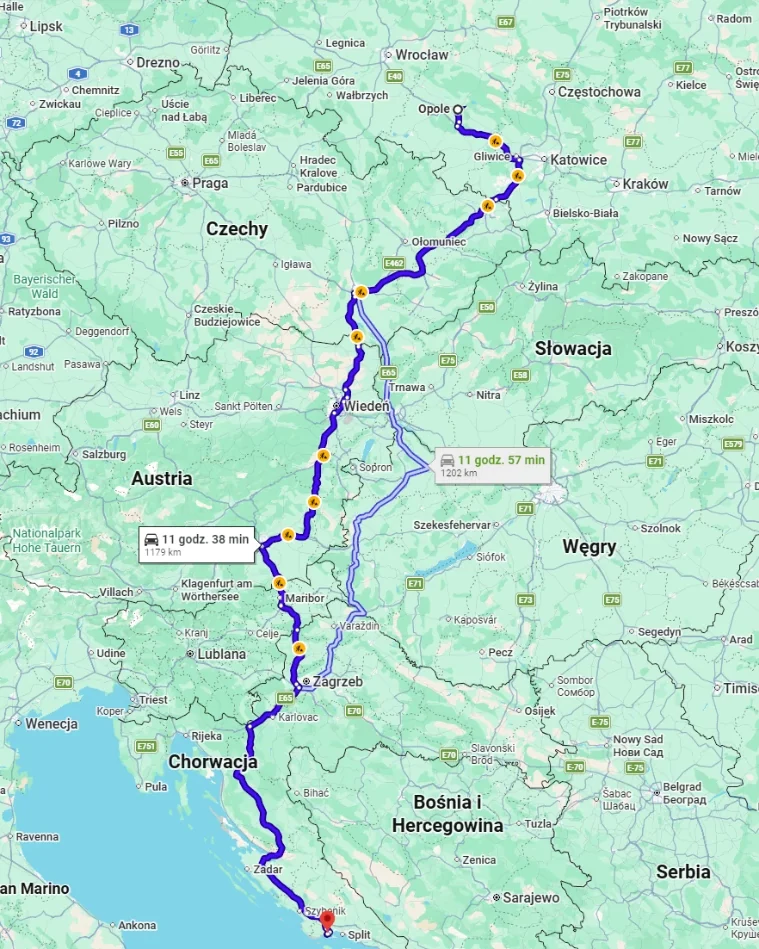
The route, the driving time and the towns along the way. No prices or availability.
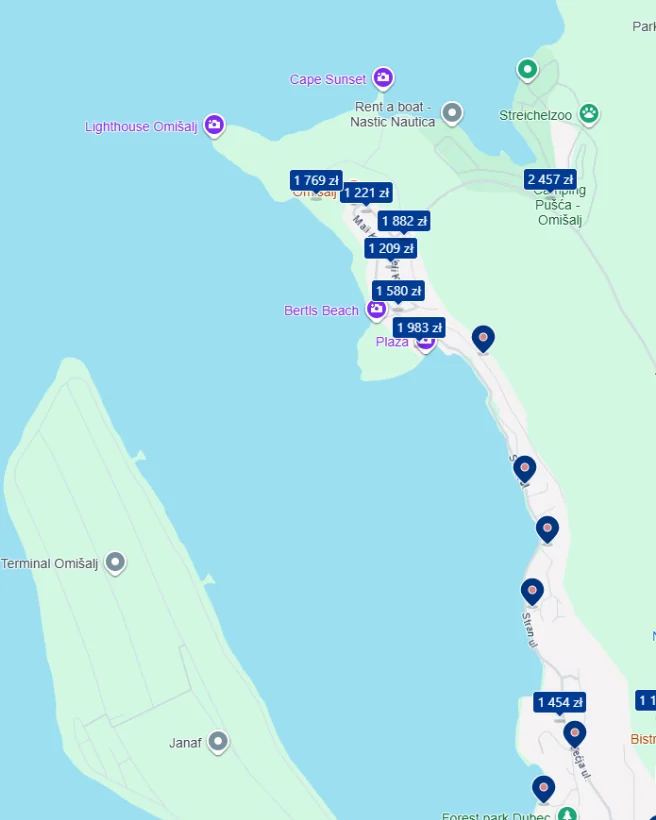
Prices, availability and reviews around one place. No route.
The Opole → Trogir route was recreated on September 20, 2026. The Booking map comes from a different search (Omišalj, September 2026) and shows what that view looks like, not a specific moment from that trip.
I started guessing which town fell sensibly along the way, checking it on Booking, going back to the map and comparing distances. Even with two windows side by side, I kept losing context. After a few days I found a place, but it meant a bigger detour than we'd planned. Even after booking, one question kept nagging me:
Did I really check this properly?
Diagnosis
Each app had half the answer.
At first I described the problem as the lack of a way to search for stays along a route. The longer I thought about it, the more I saw that this wasn't quite true.
Google Maps knew the route. Booking knew the prices, availability, reviews and every filter needed to choose a stay. It was me who had to glue those halves together by hand and make sure I didn't slip up along the way.
How do I make yet another map with hotels?
How do I bring the route's context into the place where I make the booking decision anyway?
A similar feature already existed. That didn't kill the idea; it sharpened it.
After coming back from holiday I discovered that Google Maps lets you search for hotels while viewing a route. My first reaction was simple: maybe the whole idea makes no sense?
I use Google Maps regularly myself, and I only learned about this option when I went looking for it on purpose. In what I checked, I also missed a clear setting for how far I can detour from the road, and the convenience of comparing places the way a booking site lets you.
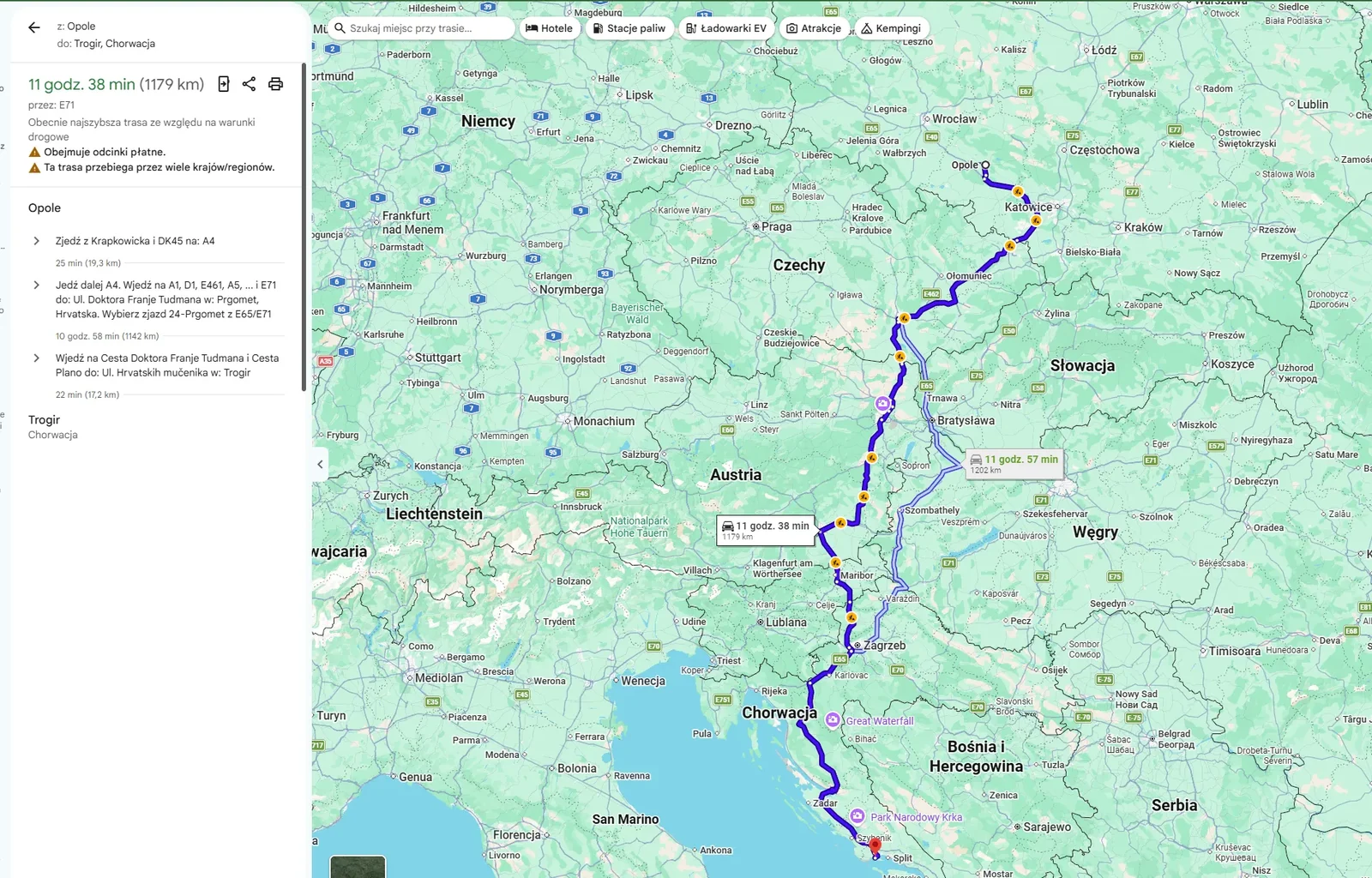
A “Search along the route” bar and five shortcuts: Hotels, Gas stations, EV chargers, Attractions, Campsites.
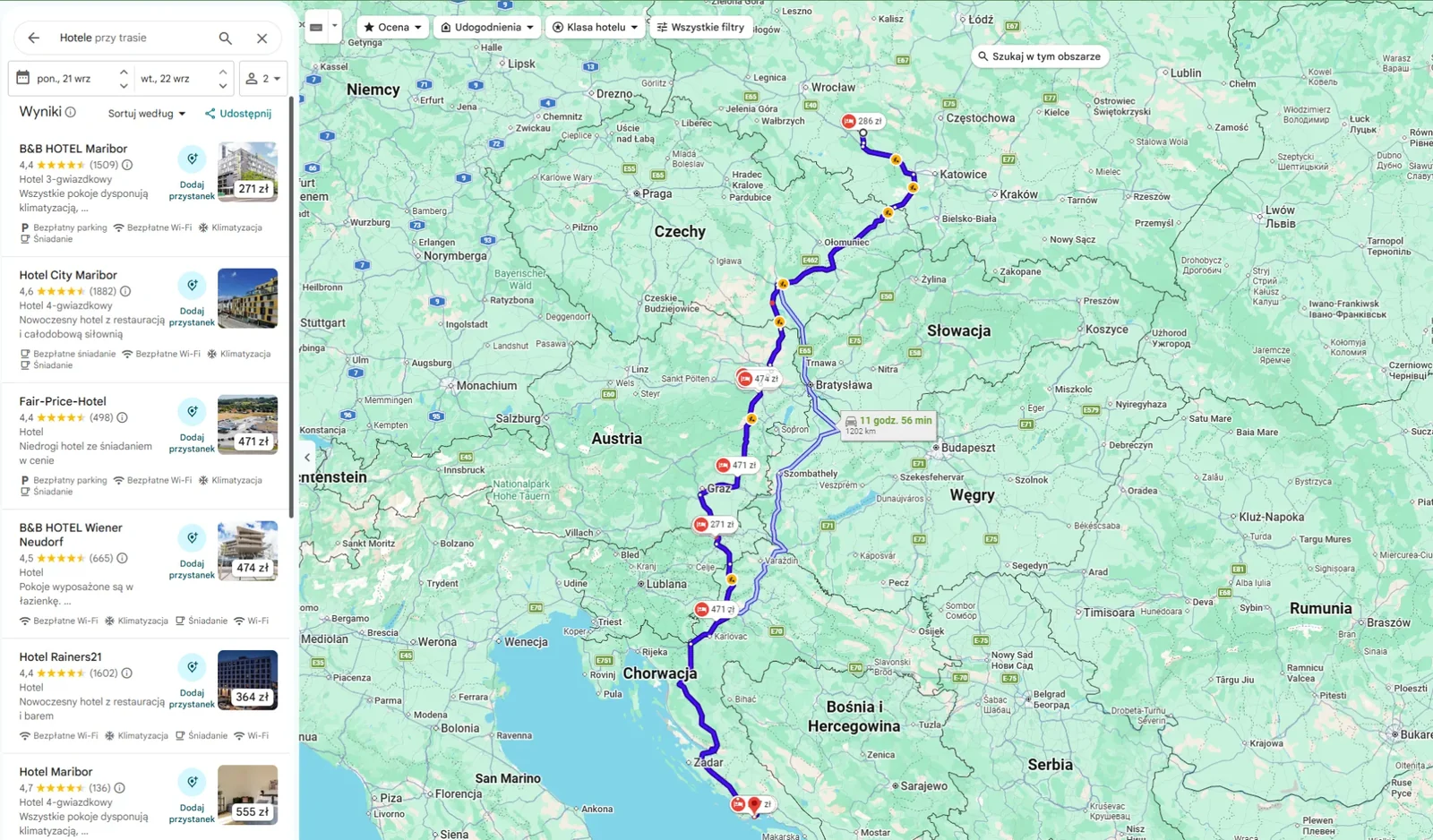
Results spread from Opole to Trogir. You can't set how far from the road a stay may be, or where along the route you want to stop.
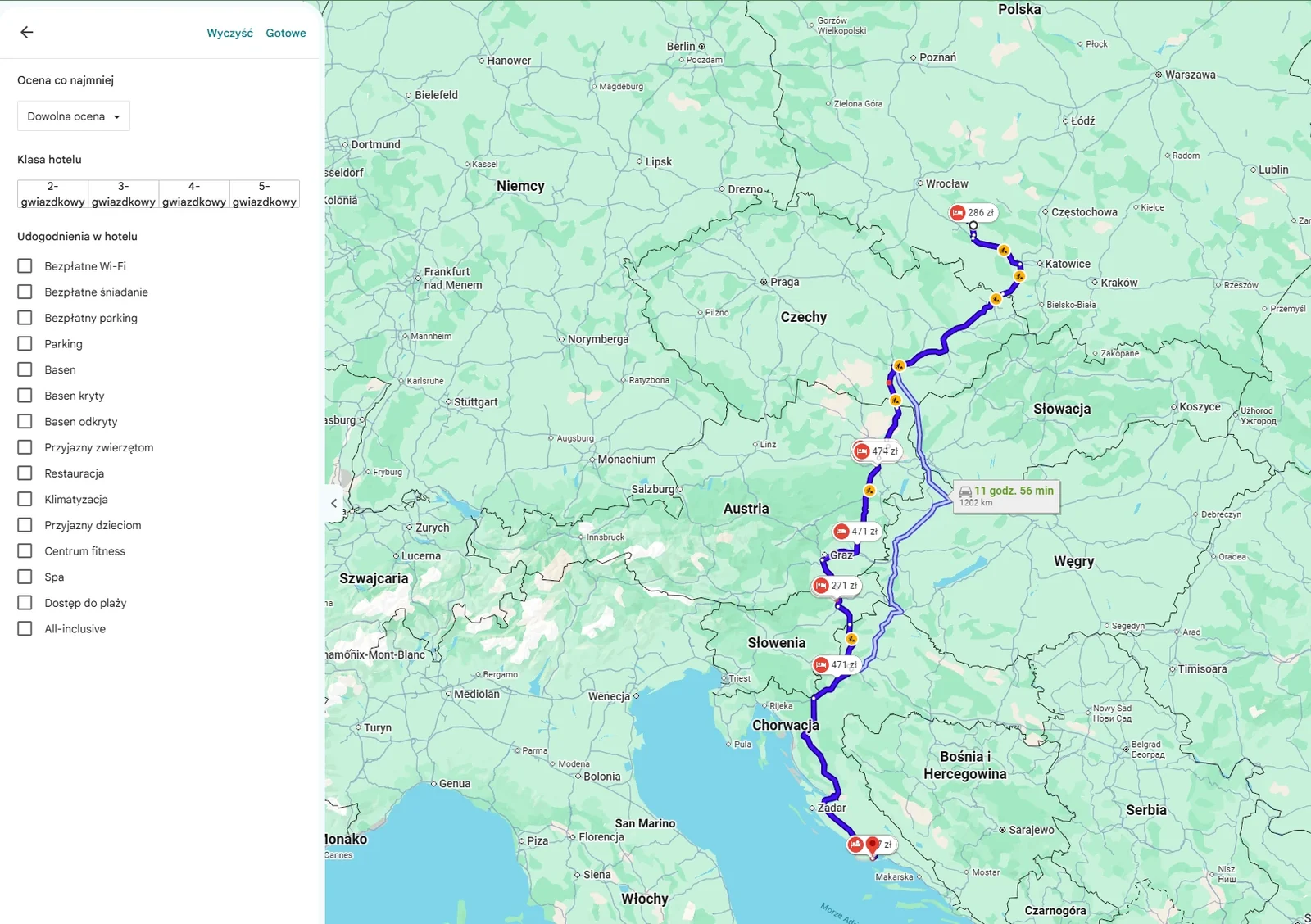
Rating, hotel class and a dozen or so amenities. Detour distance isn't one of them.
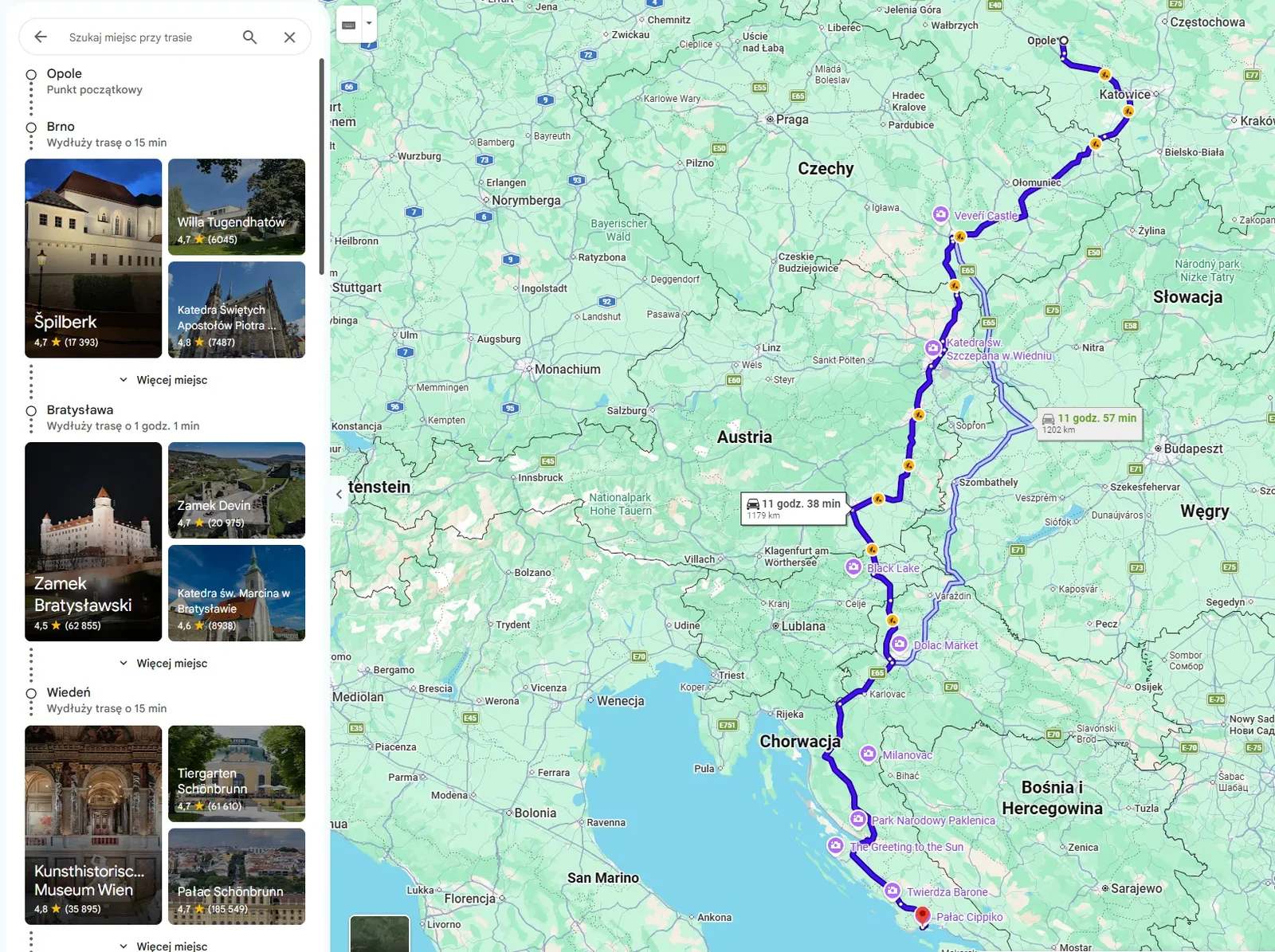
“Attractions” groups results by successive towns on the route and gives the cost for each: “Adds 15 min to the route”. Hotels don't get this breakdown.
Screenshots from September 12 and 20, 2026. This is a review of the interface, not a discoverability study: the fact that I only found the feature on purpose is my experience, not a measurement.
I wasn't trying to prove that nobody in the world had tackled this problem. I narrowed the diagnosis: the pieces exist, but they don't come together at the moment of decision, in the form someone looking for one overnight stop actually needs.
Solution
I didn't need a new app.
I considered a separate app, a browser extension, Airbnb and Booking. Every direction looked interesting until I asked myself: what am I actually trying to create, and what already exists?
Having no access to Booking's API and data closed the path to a real extension. Instead of pretending that wasn't a problem, I treated the project as a feature proposal inside Booking.com. The constraint didn't kill the project. It simply told me what project I was really doing.
- A database of stays
- Prices and availability
- Reviews
- Filters: parking, breakfast, rating, property type
- Booking and payment
The route context that was missing on my trip.
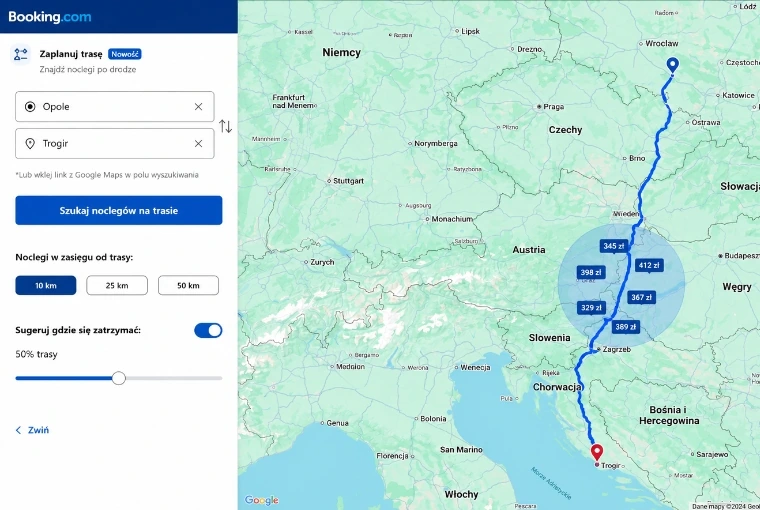
One new layer, five simple decisions
-
Points A and B, or a link from Google Maps
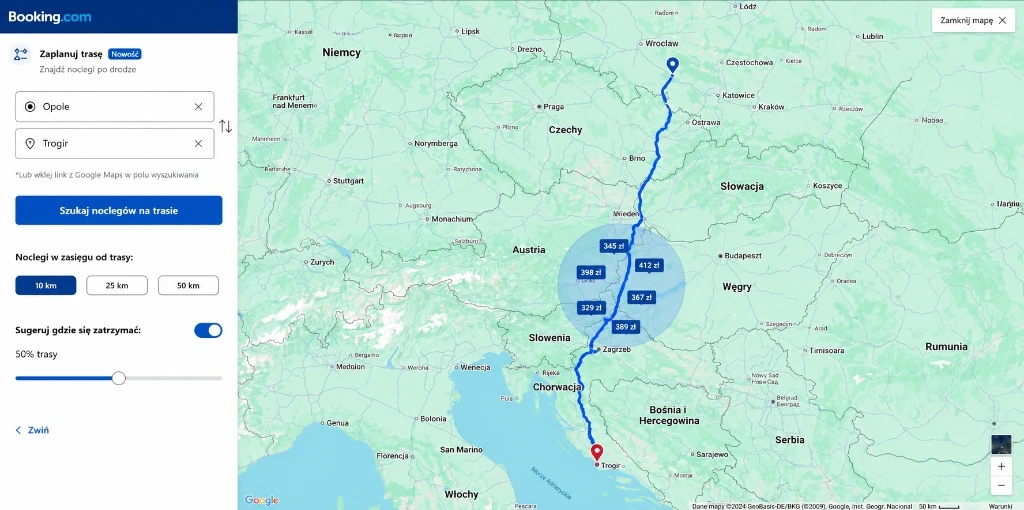
The user enters the start and the destination, and the system works out the route. Nobody draws it.
-
Detour: 10, 25 or 50 km
The maximum distance of a stay from the route, set up front.
-
The stop as a percentage of the route
A suggested place to stop, halfway by default.
-
A circle fixed to the route
The results area can only move along the route, as if on a rail.
-
Prices only in the chosen area
The map keeps only stays from that stretch of road, not from the whole route.
All of Booking's current filters keep working. Someone who needs parking, breakfast or a place rated above eight doesn't need a new version of those filters. They need them to work for stays along the way, too.
I deliberately left out drawing the route by hand, because a regular map zoom is enough for a more precise stretch, and multiple stays on one route.
Two variants answered two different risks.
My hypothesis: variant B may be less intrusive, because it uses a familiar layout. I don't present it as a sure, cheap implementation: without Booking's engineering team, that would just be a convenient story. Both directions are material for comparison, not a finished answer.
Plenty of space for the map, the Opole and Trogir fields, a choice of range and stopping point. Clear, and it explains the new feature right away. It's the frame from the top of this page.
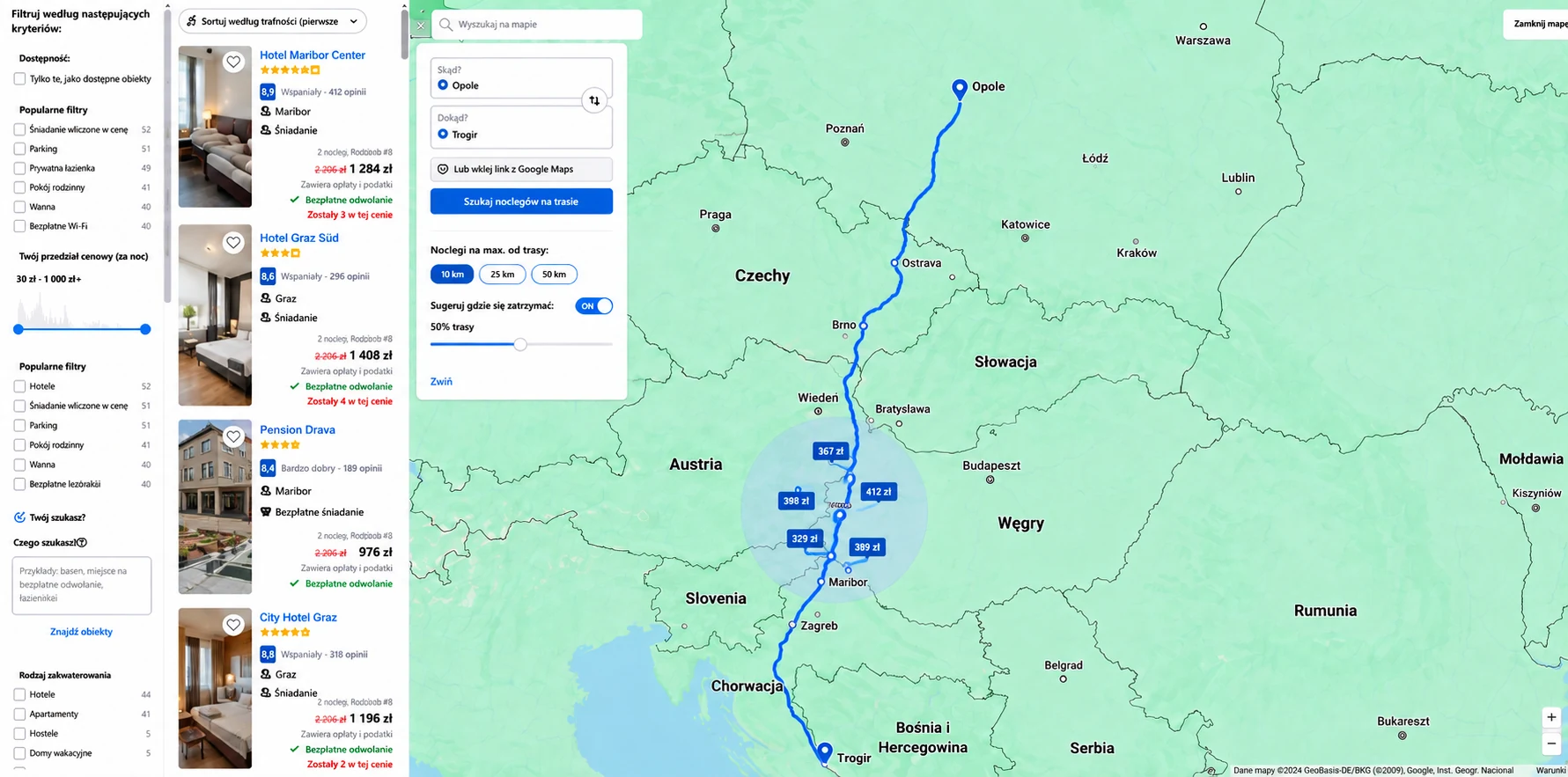
The same mechanism in Booking's current map view. I assembled it on the site's original layout: the property list and filters stay on the left, and I added the route panel and the map myself.
The hammer and the smith
A good-looking mockup could be wrong on substance.
I built variant A with the help of AI tools, and assembled variant B on Booking's original layout. That's exactly when it's easy to mistake a quick image for finished design work.
-
Striking, but with no geography
The first attempts looked striking, but they didn't respect geography. The route was too general, and the results area didn't sit where the logic of the solution said it should.
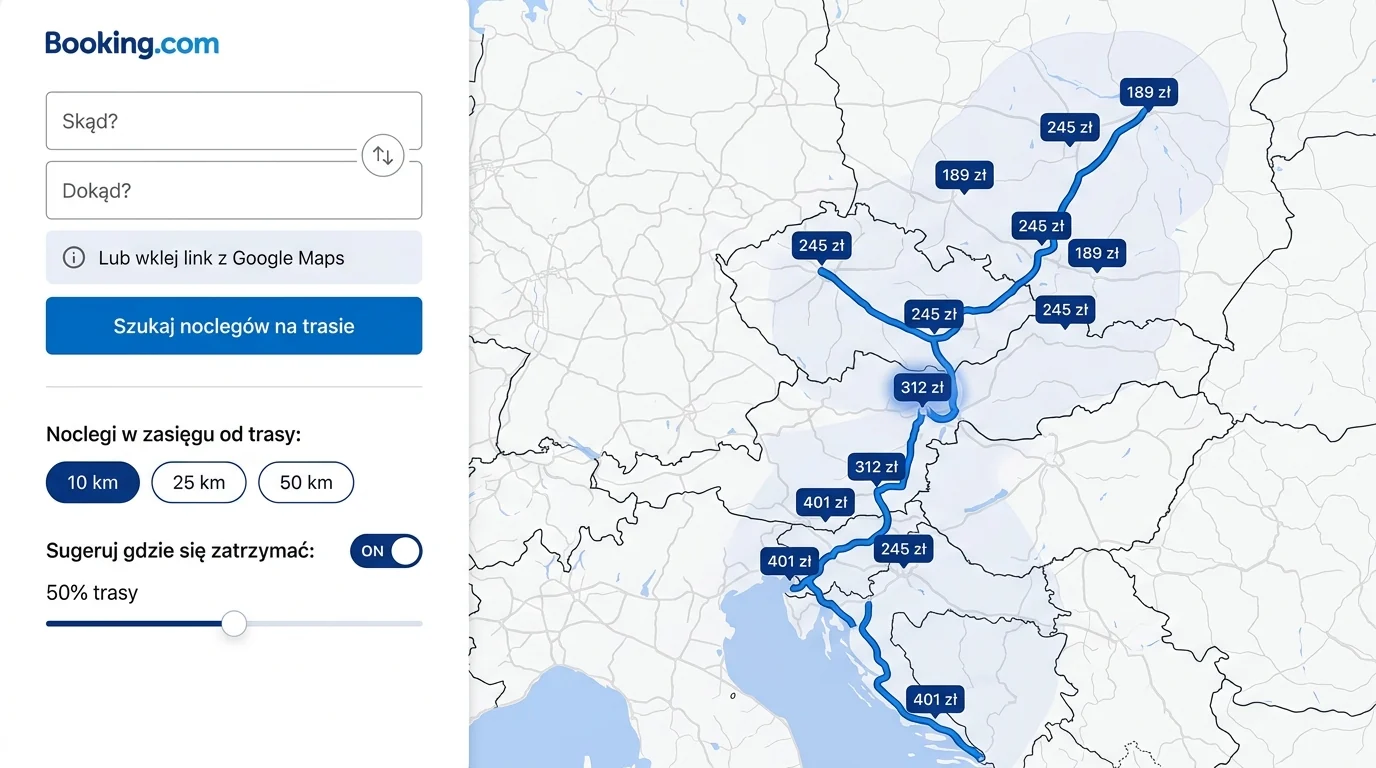
An early mockup: a map with no town names, a roughly sketched route, prices along the whole road instead of in one area. -
Changing the material, not the prompt length
I lost the most time not on the variants themselves but on weak input material. Once I understood that, I stopped trying to fix everything with ever longer prompts. I gave a real screenshot of the route, pointed to the right variant of it and wrote down the rules the screen had to follow.
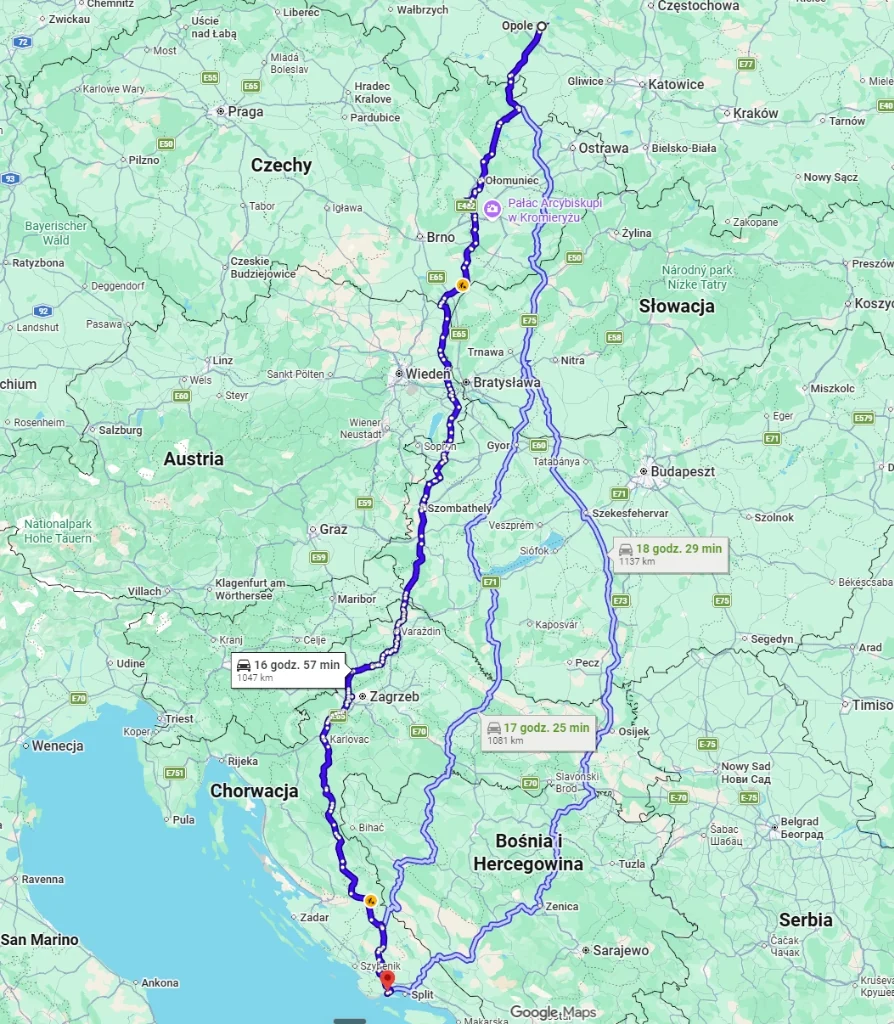
The source I provided. Only one of the three routes mattered. Screen rules
- Start in Opole, destination in Trogir
- The right towns along the way
- The line passes through the center of the circle
- Results only within its boundary
- A look consistent with Booking
-
Good architecture, wrong story
In one version of variant B, the starting point changed from Opole to Szczecin. Visually it was close to Booking. On substance, it was wrong.
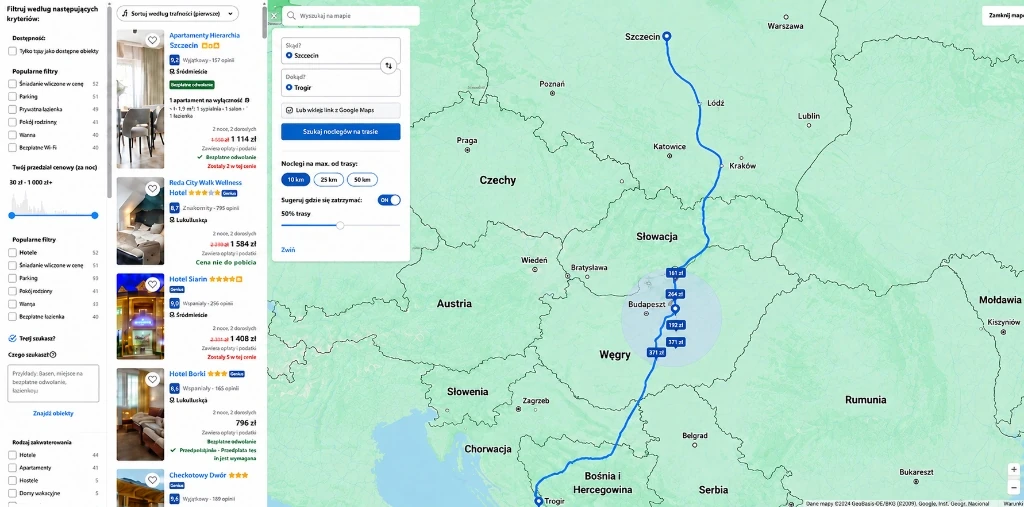
The rejected screen: a start in Szczecin, a route through Budapest, a list of stays in Szczecin. -
A fixed label isn't a fixed screen yet
After the first correction the start field said Opole, so at first glance it looked done. When I looked at the whole thing, something was still off: the route swung too far toward Prague, the circle landed too low near Zagreb, and the list still showed stays in Szczecin. Fixing one word wasn't enough.
-
One logical interface state
I had to check once more how the starting point, the route, the stopping place and the results fit together. Only in the next iteration did I bring them together into one logical state: a route through Ostrava, Brno and Vienna, a circle near Graz and Maribor, a list from the same area. That's variant B shown above.
I also rejected assumptions from AI's answers that didn't follow from the product.
The user enters the start and the destination. The system works out the route.
Parking, breakfast and rating already work in Booking.
The platform already shows it on the map.
I tested every such assumption against how the solution works, not against how professional it sounded on paper.
AI is the hammer. I still have to know where to strike, and notice when the nail goes in crooked.
Result
I don't invent results for a product nobody has shipped.
This is a concept, not a Booking feature. I have no conversion lift, no A/B test and no data that would let me say the solution works better than the current process.
The next step wouldn't be more UI polishing, but testing the mechanics with people planning a long road trip. I'd give them the same task in today's Booking and in both variants of the concept.
Find a place to stay roughly halfway along the Opole → Trogir route, no more than 25 km from the road.
- Accuracy
- Can they find a stay at the given point on the route and within the detour limit?
- Time
- How long does it take them to reach a sensible choice?
- A second map
- Do they still open a second map to verify the decision?
- Confidence
- How sure are they of their choice before booking?
After launch I would also measure
- Use of route mode
- Search-to-booking conversion
- Time to booking
- Drop-offs
Only after a test like that would I choose a variant and refine the interaction. Today these are success criteria, not success.
I didn't run formal user interviews or mockup tests. The starting point is my own problem and an analysis of the existing ways to solve it. A proper test would need a working prototype on real data, and without Booking's API I don't have access to that data.
Takeaway
The most important result isn't a screen with a blue route.
What taught me the most was the moment I had to stop defending the first version of the idea. Google Maps already had part of the solution. I had no access to Booking from the inside. The mockups I built with the help of AI could look good and break the basic logic at the same time.
At each of those moments I could have padded the story to make the project seem more complete. Instead, I narrowed the problem, rejected convenient assumptions and went back to the question it all started with:
How do you find a place to stay along the way without guessing whether it's really along the way?